Download Print Version of Comprehensive Calendar
Comprehensive Calendar
The Comprehensive Calendar offers staff a shared view of key operational activities, milestones, deadlines and deliverables across PGCPS. Use it to see what's coming, plan ahead and better understand how work across the district connects. The calendar is designed to help you stay informed and coordinate more effectively to move our work forward.
How to Use This Calendar | How to Filter the Calendar | How to Add Multiple Calendars to Your Google Calendar | Add a Specific Calendar
Calendar Managers: How to Add or Move an Event in Google Calendars
Important Note: In order to view all of the embedded calendars you must be fully signed in to your browser with your PGCPS Gmail account. If you are not fully signed in you will only see calendars that are public.
How to Sign into Chrome with Gmail account and Manage Settings
- Comprehensive Calendar
- PGCPS School Year Calendar
- Academics Calendar
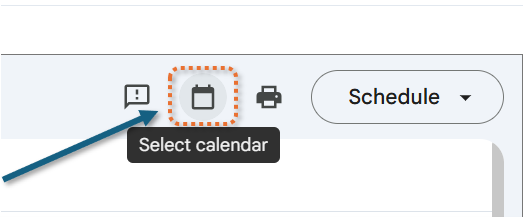
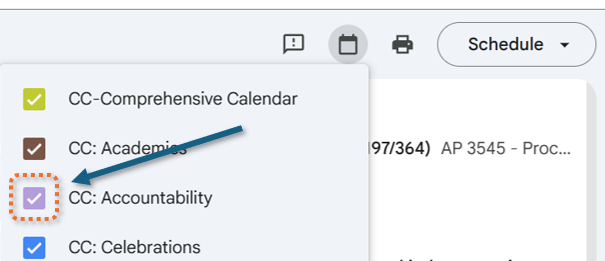
How to Add Calendars to Your Google Calendar Area
You can add calendars to your Google Calendar Area to make planning easier for you.
Scroll to the lower left corner and click on the Add to Google Calendar link.
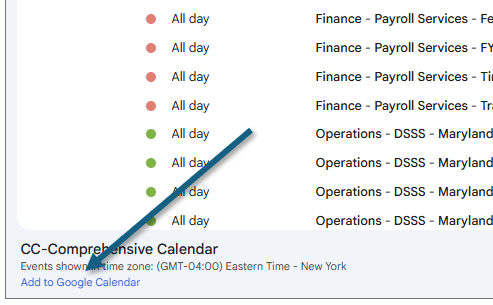
A pop-up will show the calendars that are selected on the main screen. You can deselect any calendars you are not interested in. If you have filtered out the calendar you want.
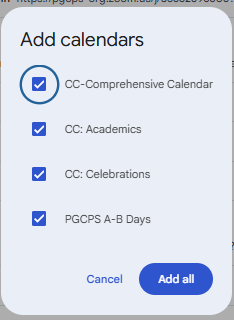
If you are not seeing the calendars you want to add you may need to restore the comprehensive calendar view.
Click Cancel to close the pop-up.
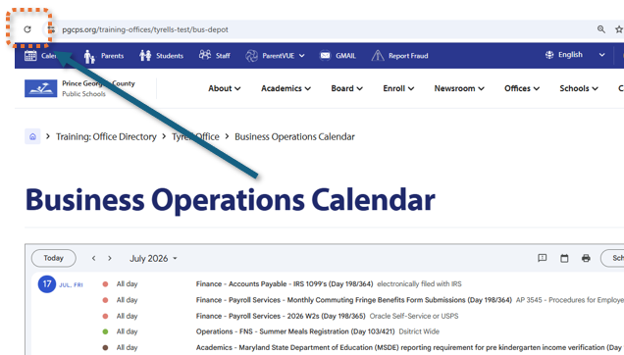
Click the refresh button in the upper right corner and it will restore the calendars. Then you can filter using the Select Calendar button again or after clicking Add to Google Calendar.